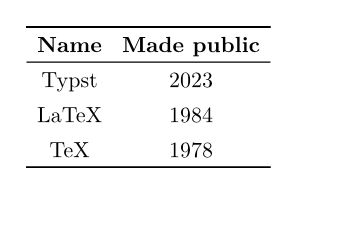
如何实现三线表?
手动方法
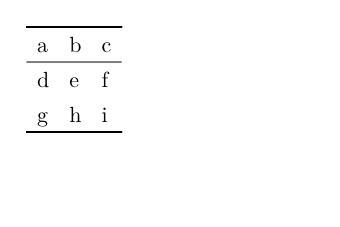
使用 stroke: none 隐藏默认边框,然后使用 table.hline() 画线即可。
typst
#table(
  columns: 3,
  stroke: none,
  table.hline(),
  table.header([a], [b], [c]),
  table.hline(stroke: 0.5pt),
  [d], [e], [f],
  [g], [h], [i],
  table.hline(),
)
封装成函数
来源:https://forum.typst.app/t/is-there-any-simple-way-of-creating-a-three-line-table-like-latex/1193/8
typst
#let three-line-table = it => {
  if it.children.any(c => c.func() == table.hline) {
    return it
  }

  let toprule = table.hline(stroke: 0.08em)
  let bottomrule = toprule
  let midrule = table.hline(stroke: 0.05em)

  let meta = it.fields()
  meta.stroke = none
  meta.remove("children")

  let header = it.children.find(c => c.func() == table.header)
  let cells = it.children.filter(c => c.func() == table.cell)
  if header == none {
    let columns = meta.columns.len()
    header = table.header(..cells.slice(0, columns))
    cells = cells.slice(columns)
  }

  return table(
    ..meta,
    toprule,
    header,
    midrule,
    ..cells,
    bottomrule,
  )
}

#show table: three-line-table

#table(
  columns: 2,
  align: center,
  table.header([*Name*], [*Made public*]),
  [Typst], [2023],
  [LaTeX], [1984],
  [TeX], [1978]
)